Most stores lose the sale after the add-to-basket click.
A good-looking product page gets people to add to basket. Whether they pay depends on everything after it: delivery costs appearing too late, a forced account sign-up, a payment form that is fiddly on a phone. On GSK's consumer healthcare brand sites, mapping the checkout step by step found basket abandonment above 70%, driven largely by forced account creation and a checkout that was hard to complete on mobile.
So I design stores from the checkout backwards. Product structure, delivery rules, payment options and VAT display are planned before the homepage is, and every step of the journey is tracked in GA4 from launch day, so you can see where shoppers drop out and fix it with evidence rather than guesswork.
Everything between browsing and a paid order.
Products & Collections
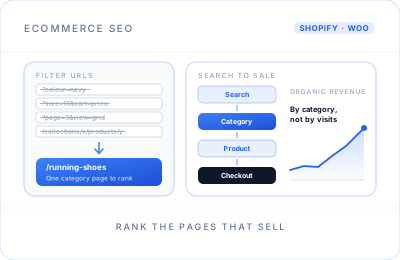
Collections, filters and variants organised the way your customers shop, with clean URLs that each target a real search term.
A Shorter Checkout
Guest checkout, as few fields as possible, delivery costs shown early and express payment buttons for shoppers on their phones.
Payments
Shopify Payments, Stripe or PayPal connected and tested with real transactions, including Apple Pay and Google Pay where your provider supports them.
Shipping & Delivery
UK and international zones, weight or price-based rates, free-delivery thresholds, and local delivery or click and collect if you offer them.
UK VAT Settings
VAT-inclusive prices for consumers, the correct tax settings on products and delivery, and VAT shown clearly on order confirmations.
Product Schema
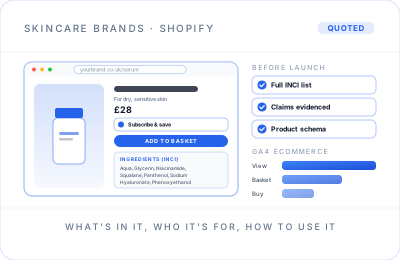
Structured data for price, availability and brand on every product, ready for a Google Merchant Center feed and free product listings.
GA4 Ecommerce Tracking That Matches Your Orders
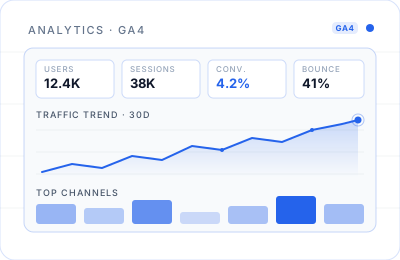
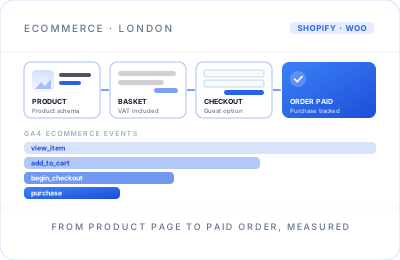
view_item, add_to_cart, begin_checkout and purchase events with product data and transaction IDs, respecting cookie consent. Before launch I place test orders and check that GA4 revenue lines up with the store's own order records.
Shopify or WooCommerce: which fits your store?
Stores are built on both platforms, so the recommendation follows your products, your team and your budget rather than my preference.
| Consideration | Shopify | WooCommerce |
|---|---|---|
| Hosting & security | Hosted, updated and secured by Shopify | You choose the hosting; WordPress and plugin updates are your responsibility |
| Running costs | Monthly Shopify plan plus any paid apps; extra transaction fees usually apply if you use a payment provider other than Shopify Payments | The plugin is free; you pay for hosting, paid extensions and payment provider fees |
| Checkout | Shopify's own fast, familiar checkout, with limited room for customisation | Fully customisable, which also means more to test and maintain |
| Content & blogging | Capable, but basic compared with WordPress | WordPress's full content tools alongside the shop |
| Flexibility | Apps cover most needs, within Shopify's rules | Almost anything is possible with custom development |
| Best suited to | Product-led brands that want to focus on selling, not on running software | Content-led businesses, unusual product rules, or brands already on WordPress |
New store or a move from another platform, the same careful route.
Moving from Wix, Squarespace, Etsy, Magento or an old WooCommerce install? Steps 04 and 06 are where rankings and revenue are protected.
Discovery & Platform
Your products, margins, delivery setup and team. You get a platform recommendation, a written scope and a fixed price.
Catalogue Plan
Collections, filters, variants and URL structure mapped out, with search terms assigned to the pages that should rank.
Design & Build
Product, collection, basket and checkout pages designed mobile-first and built on a private staging store you can click through.
Data & Redirects
Products, customers and order history moved where the platforms allow, and every old URL mapped to its new home with a 301 redirect.
Test Orders & Tracking
Real test payments, VAT, delivery rates, order emails and discount codes checked, and GA4 purchases matched against orders.
Launch & Watch
Search Console, broken links and checkout conversion watched closely for the first month, with fixes made as issues appear.
Selling online in the UK: what your store needs to support
Consumer rules shape how an online store has to work. These are the points the store is built around; the wording of your terms and your tax position are for you and your advisers to confirm.
- Clear total prices. UK rules generally expect prices shown to consumers to include VAT, with delivery charges made clear before the customer commits to buy.
- Information before the order. Your business name and contact details, the main features of the goods, the total cost and delivery arrangements should be easy to find before checkout.
- The right to cancel. Under the Consumer Contracts Regulations, online shoppers can usually cancel most orders within 14 days of receiving the goods, with some exceptions such as personalised or perishable items. Your returns page should explain how it works.
- Consent for tracking. Analytics and advertising cookies need consent under PECR and UK GDPR, so I set up a consent banner and Google Consent Mode that respect the shopper's choice.
- VAT beyond the basics. Registration, reduced rates and selling to the EU or Northern Ireland have their own rules. Your accountant confirms them; I configure the store to match.
The store is built to support these requirements, but this is not legal or tax advice. Check the current guidance on GOV.UK and with your own advisers before launch.
Checkout data from global brands, applied to your store.
At Philip Morris International I led global ecommerce performance monitoring, a GA4 migration and a standardised KPI framework across 50+ markets. At GSK, an analytics-led checkout programme across 15+ brand sites led to guest checkout and a mobile-first rebuild that delivered a 20% conversion lift. Those were analytics and optimisation roles rather than store builds, and they are why every store is built to be measured step by step.
Ecommerce website design in London that pays for itself in data.
London shoppers are spoilt for choice and quick to leave. A store that looks polished but loads slowly on a phone, hides delivery costs or asks for an account before payment will lose sales it has already paid to attract. Good ecommerce website design removes those reasons to leave, one step at a time, and proves it with numbers.
That is where my background helps. I spent years inside enterprise ecommerce analytics, looking at why real shoppers abandon real checkouts. Every store is built with GA4 ecommerce tracking that reconciles with your orders, so from the first week you know your conversion rate, your average order value and which step loses the most people.
Those numbers then guide what to improve next. If shoppers add to basket but stall at delivery, the fix is different from a store where they never reach the basket at all. Knowing which problem you have keeps budget away from redesigns that will not move sales.
A store also has to be found. Collection pages are planned around real search terms and every product carries structured data, which gives ecommerce SEO a head start and makes a Merchant Center feed straightforward for Google Shopping ads if you run them. Beauty and skincare brands have their own considerations, covered on the skincare website design page, and repeat purchase is where email marketing and CRM earn their keep.
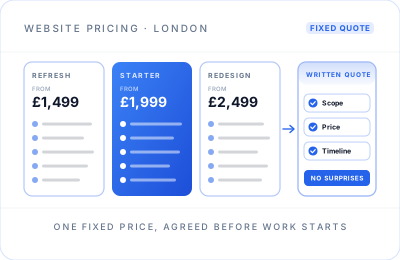
Stores start from £2,499, with larger catalogues and integrations priced by fixed written quote after a free discovery call; the pricing page shows how a store compares with the other packages. After launch, a maintenance plan can keep apps, themes and plugins up to date. I work remotely with brands across London and the UK.
Ecommerce questions.
Cost, platforms, migration, VAT, tracking and Google Shopping.
Online stores start from £2,499 for a Shopify or WooCommerce build with product and collection setup, checkout, payments, delivery, UK VAT settings and GA4 ecommerce tracking. Larger catalogues, integrations and migrations get a fixed written quote after a free discovery call. Budget for running costs too: platform or hosting fees, any paid apps, and payment processing charges.
Choose Shopify if you want hosting, security and checkout managed for you and mainly need to sell products well. Choose WooCommerce if content matters as much as products, you need unusual product rules, or you already run WordPress. I recommend one on the discovery call based on your catalogue, team and budget.
Yes. I migrate products, collections and customer records where the platforms allow it, and map every old product and category URL to its new address with 301 redirects, which protects the rankings you have built. Test orders, tracking and redirects are checked before launch, and Search Console is monitored afterwards.
Yes. I configure tax settings so prices display the way UK consumers expect, with VAT included, and so receipts and reports show VAT correctly. Your registration status, rates and any sales to the EU or Northern Ireland should be confirmed with your accountant, and I set the store up to match their advice.
I set up the GA4 ecommerce events, from viewing a product and adding to basket through to checkout and purchase, with product names, values and transaction IDs. Then I place test orders and check that GA4 revenue matches the store's own order records, so you can trust the numbers you make decisions on.
Every product page gets structured data for price and availability, which helps Google understand your products. Appearing in Shopping also needs a Google Merchant Center account and a product feed, which I can connect. Free product listings are possible; paid Shopping ads are a separate Google Ads decision with their own budget.