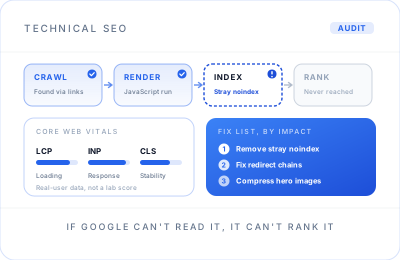
Every page has to get through four gates before it ranks.
Google has to find a page, render it, decide to index it, and only then weigh it against competitors. Most technical problems are a page quietly failing one of the first three gates: a forgotten noindex tag, a redirect chain, content that only appears after JavaScript runs, a canonical pointing somewhere else.
The tools that find these problems are easy to buy. Deciding which of the hundreds of warnings actually cost you traffic is the hard part. That judgement comes from nearly 20 years working on large, multi-domain enterprise sites, where a small technical mistake could affect thousands of pages at once.
The plumbing behind every ranking you want.
Crawlability & Indexation
Search Console's Page indexing report, the old Coverage report, read properly: why pages are excluded, and which exclusions actually matter to you.
Core Web Vitals & Speed
LCP, INP and CLS judged on real-user data, not just a lab score. Images, fonts, scripts and third-party tags tackled in order of impact.
Architecture & Internal Links
Important pages a few clicks from the homepage, a logical URL structure, and internal links whose anchor text describes where they lead.
Structured Data
Organisation, service, product, article and breadcrumb schema where it genuinely fits, checked against Google's documentation and kept free of errors.
Canonicals & Redirects
Duplicate URLs consolidated, redirect chains and loops removed, and broken pages that still have backlinks redirected somewhere useful.
JavaScript Rendering
Checking that content and links built with JavaScript actually appear in the rendered page Google sees, on React, Vue and heavy page-builder sites.
XML Sitemaps & robots.txt
Sitemaps that list only the indexable, canonical URLs you want found, and a robots.txt file that blocks what genuinely should be blocked and nothing else. Small files, easy to get wrong, and a common cause of pages vanishing.
Start with what you're seeing. I'll trace the cause.
Most people come to technical SEO with a symptom, not a diagnosis. These are the ones I see most often, and where I look first.
| What you notice | Usual technical cause | Where I look first |
|---|---|---|
| Pages missing from Google | Stray noindex, robots.txt block, canonical pointing elsewhere, no internal links | Page indexing report, URL Inspection, full crawl |
| Traffic fell after a redesign | URLs changed without 301 redirects, content or titles lost | Old URL list against new, redirect map, before-and-after queries |
| Slow or jumpy on mobile | Oversized images, render-blocking scripts, third-party tags, late-loading fonts | Real-user Core Web Vitals, Lighthouse, tag inventory |
| The wrong page ranks | Two pages competing, duplicate URL variants, weak internal signals | Canonicals, internal anchors, Search Console queries by page |
| Rich results disappeared | Schema removed in an update, invalid markup, or a change in Google's eligibility | Rich Results Test, Search Console enhancement reports |
| Google shows an empty page | Content or links only created by JavaScript after load | Rendered HTML in URL Inspection, compared with the source |
Audit, prioritise, fix, then prove it worked.
Scoping Call
What changed, what you've noticed and what the site runs on. You get a fixed price within the audit range before anything starts.
Crawl & Data Pull
A full crawl alongside Search Console, real-user speed data and GA4, so every finding is tied to pages that actually get traffic.
Prioritised Report
A plain-English report ranking each issue by impact and effort, walked through on a call so nothing is left open to interpretation.
Fixes
I make the changes on WordPress or Shopify, or write developer tickets with the exact change, the reason and the test.
Validation
Re-crawl, URL Inspection and Search Console validation requests, so each fix is confirmed from Google's side, not assumed.
Ongoing Monitoring
If you want it, technical health becomes part of a monthly SEO engagement, so new releases don't quietly undo the work.
Site migrations: the riskiest week in SEO
A new platform, a new domain or a redesign that changes URLs can wipe out years of rankings if it's handled casually. If you're planning one, involve technical SEO before the new site is built, not after launch. This is the checklist I work through:
- An inventory of every URL with traffic, rankings or backlinks, taken before anything changes
- A one-to-one 301 redirect map, with no mass redirects to the homepage
- Titles, headings, content and schema that rank carried across deliberately
- Staging kept out of Google, and that block removed on launch day
- New sitemap submitted and Search Console watched closely for the first weeks
If the migration is part of a rebuild, see website redesign; the SEO protection above is built into how I run those projects.
Migrations across nine domains, delivered on time.
At River Island I led the full analytics migration from Adobe Analytics to Google Analytics 360 across nine international domains plus the iOS and Android apps, with reporting continuity intact. It was a measurement migration rather than an SEO one, but the discipline is identical: inventory everything, map it one-to-one, test before switching, and validate afterwards.
Read the River Island case studyTechnical SEO for London sites, prioritised and actually fixed.
Technical SEO rarely gets attention until something goes wrong: rankings slide after a redesign, a new section never appears in Google, or a developer update quietly adds a noindex tag to the whole blog. By then, a lot of traffic has already gone. A proper audit finds those weaknesses early and puts them in order, so the fixes that protect revenue happen first.
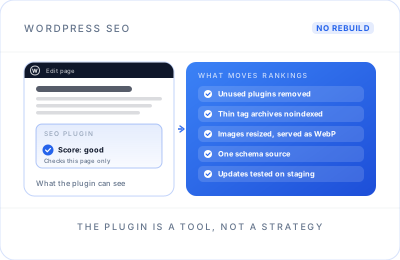
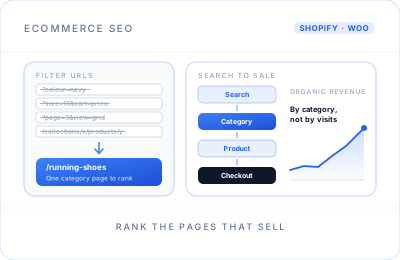
The businesses I help usually fall into one of three groups. Service firms whose site looks fine but underperforms, often on WordPress, where the causes are usually plugins, speed and archives; see WordPress SEO. Online shops with thousands of URLs created by filters and product variants, covered under ecommerce SEO. And companies about to migrate or rebuild, who want their rankings protected rather than repaired.
Every audit ends with a list you can actually work through. Each issue comes with a plain explanation, the pages affected, the likely effect on traffic and who needs to fix it: you, me or your developer. Anything that needs a developer arrives as a ticket they can pick up without a meeting, and I check the change once it has been released.
The same foundations matter for AI search. Pages that are slow, blocked or rendered only in JavaScript are hard for any system to read, which is why technical work sits underneath my AI search optimisation as well as classic rankings.
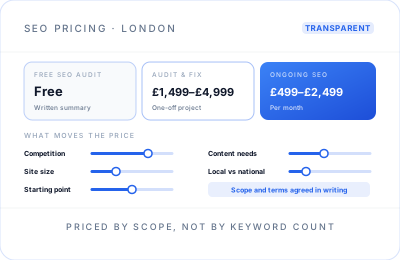
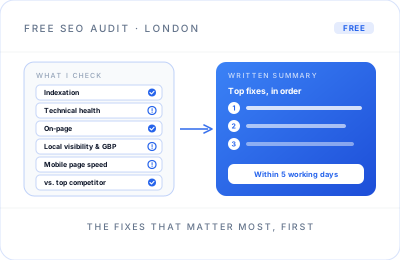
A one-off technical audit and fix typically costs £1,499 to £4,999, and I work remotely with businesses across London and the rest of the UK. If you'd like a quick view first, request a free SEO audit, or compare options on my SEO pricing page.
Technical SEO questions.
Audits, cost, speed, indexing and migrations.
I crawl the whole site, then check indexation in Search Console, Core Web Vitals from real-user data, architecture and internal links, canonicals and redirects, structured data, JavaScript rendering, XML sitemaps and robots.txt. You get a written report ranking every issue by likely impact and effort, not a raw export of thousands of warnings.
A one-off technical audit and fix typically costs £1,499 to £4,999. The main factors are the size of the site, the platform, and whether I make the fixes myself or brief your developer. A small WordPress site sits near the lower end; a large ecommerce or JavaScript-heavy site sits higher.
Yes, but modestly. Google says Core Web Vitals are used by its ranking systems, while relevant, helpful content matters more. The bigger effect is on people: slow or jumpy pages lose visitors before they enquire or buy. I fix whatever has the most impact on real users first, rather than chasing a perfect score.
The usual reasons are a stray noindex tag, pages blocked in robots.txt, canonical tags pointing elsewhere, thin or duplicate content, or pages with no internal links pointing to them. Search Console's Page indexing report shows the reason Google gives for each URL, and that is where I start before changing anything.
Both. On WordPress and Shopify I usually make the fixes myself. On custom builds I write clear tickets for your developer, with the exact change, the reason and how to test it, then check the result after release. Either way, every fix is validated in Search Console rather than simply ticked off.
Start before the new site is built. List every URL that earns traffic or links, map each one to its new equivalent with a 301 redirect, keep the titles and content that rank, and test everything on staging. After launch, submit the new sitemap and watch Search Console closely for several weeks.