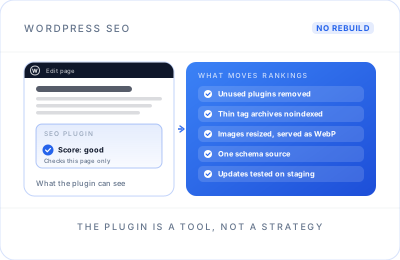
A green light in the editor is not an SEO strategy.
SEO plugins are useful. They give you fields for titles and descriptions, generate a sitemap and add basic schema. But the score they show only checks the page you're editing against a keyword you typed in. It can't see that your theme loads three sliders' worth of scripts, that 400 tag pages are competing with your services, or that two plugins are describing the same page to Google in different ways.
A typical small business WordPress site I look at has a page builder, 30-plus plugins, a hero image several megabytes in size and every archive type indexed. None of that is unusual, and all of it is fixable without starting again.
The WordPress layers that decide how you rank.
SEO Plugin Configuration
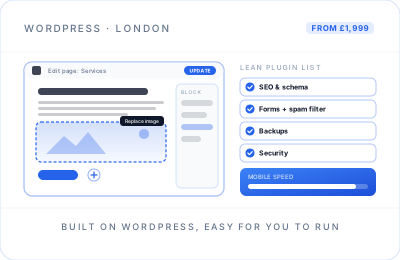
Yoast SEO, Rank Math or SEOPress set up properly: title templates, which archives are indexed, sitemaps, breadcrumbs and sensible schema defaults.
Theme & Page-Builder Bloat
Multipurpose themes and heavy builders load code you never use. I trim what can be trimmed, and tell you honestly when a lighter theme would pay for itself.
Permalinks & Redirects
Clean, readable URLs, and 301 redirects managed in one place whenever a slug changes, so old links and rankings survive every edit.
Categories, Tags & Archives
Tag, author, date and attachment pages that add hundreds of thin URLs, tidied up so Google spends its time on the pages that matter.
Image Optimisation
Images resized to the size they display at, served in WebP, lazy-loaded below the fold and given alt text that actually describes them.
Schema Without Conflicts
One source of structured data, rather than the theme, the SEO plugin and a reviews plugin each describing the same page differently.
Security & Updates
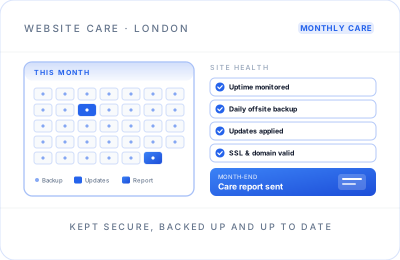
Out-of-date plugins are a common way into WordPress sites, and injected spam pages can undo years of rankings. I remove unused plugins, apply updates safely and, if you want it handled every month, move the site onto a website maintenance plan.
WordPress SEO problems I fix most often.
If you recognise one of these, it's probably costing you traffic right now.
| Problem | What you notice | The fix |
|---|---|---|
| “Discourage search engines” left ticked | The site barely appears in Google after launch | Untick it under Settings › Reading, check robots.txt, resubmit the sitemap |
| Every archive indexed | Hundreds of tag, author and date URLs in Search Console | Noindex or disable the thin ones, merge overlapping tags |
| Attachment pages | Image URLs showing up as pages with no content | Redirect them to the file or the parent post |
| Two plugins, one job | Duplicate titles, meta tags or schema in the page source | One SEO plugin and one schema source, settings migrated |
| Page-builder weight | Slow loading and laggy taps on mobile | Lighter templates, fewer plugins, caching, better hosting |
| Slugs changed without redirects | 404 errors and pages dropping out of the results | A redirect map with 301s for every changed URL |
| Injected spam pages | Strange titles in Google, security warnings in Search Console | Clean up, harden logins, update, then request a review |
Backed up, staged, tested, then live.
Access, Backup & Staging
Admin, hosting and Search Console access, a full backup, and a staging copy of the site before anything is touched.
Plugin & Theme Audit
Every plugin listed with what it does, what it loads on each page, and whether something else already does the same job.
SEO Plugin Set-Up
Title templates, indexing rules for each content type, sitemaps, breadcrumbs and schema defaults configured and checked in the page source.
Speed Work
Images, caching, scripts and plugin weight improved on staging, measured before and after, then released to the live site.
Archives, Redirects & Content
Thin archives tidied, redirects consolidated, and key service pages and posts improved for the searches they should win.
Handover or Upkeep
A recorded walkthrough of what changed and how to keep it that way, or ongoing SEO and updates handled for you.
Your live site is not a test environment
Most WordPress disasters happen when someone updates or removes a plugin on the live site and hopes for the best. The fixes on this page touch the parts of WordPress that are easiest to break, so I follow the same routine every time:
- A full backup of files and database before any change
- Changes made and checked on a staging copy first
- One change at a time on the live site, with forms and checkout tested afterwards
- No major updates just before your busiest trading days
- A written log of what changed, so anything can be rolled back
WordPress SEO in London, without rebuilding the site.
A lot of London businesses run on WordPress because it was the sensible choice when the site was built: flexible, cheap to start and easy to edit. Years later, the same site has collected plugins from three different developers, a theme that hasn't been updated, and a blog whose tags outnumber its posts. Rankings slip slowly, and it's rarely clear why.
The good news is that WordPress problems are well understood. Most can be fixed in place, with no redesign, by configuring the SEO plugin properly, cutting page weight, tidying archives and giving Google one clear version of every page. Where the theme really is the obstacle, I'll tell you, and a rebuild through WordPress website design may be the better investment.
I also leave the site easier to look after. That means fewer plugins to update, one place to manage redirects, clear rules on which content types are indexed, and a short written note of every setting I changed. Whoever works on the site next, including you, can see what was done and why, instead of inheriting another mystery.
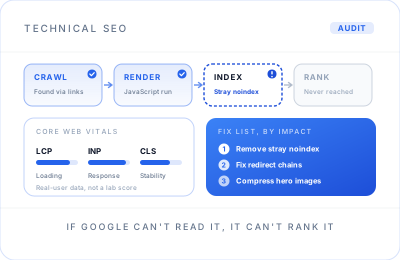
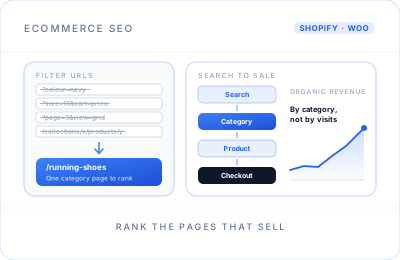
WordPress SEO overlaps with broader technical SEO, and if your shop runs on WooCommerce, the product and category work is covered under ecommerce SEO. For clinics, trades and firms that rely on nearby customers, the fixes here pair naturally with local SEO.
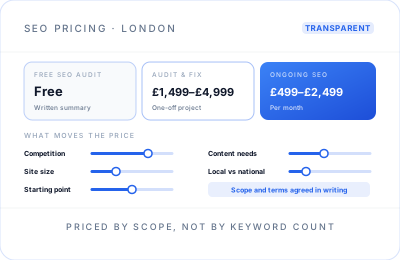
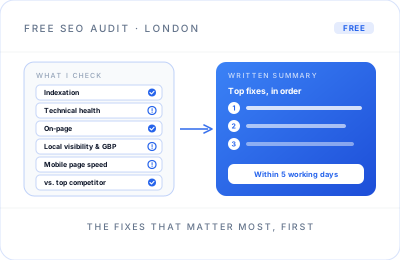
I work remotely with WordPress site owners across London and the UK, directly and with a fixed written scope. One-off clean-ups fall within the £1,499 to £4,999 technical audit and fix range, and ongoing work typically runs £499 to £2,499 a month; details are on my SEO pricing page. Not sure where to start? Request a free SEO audit.
WordPress SEO questions.
Plugins, speed, archives, security and cost.
Yes, WordPress is a solid platform for SEO, but it is not optimised out of the box. Your theme, page builder and plugins decide how fast, clean and crawlable the site really is. A well-configured WordPress site ranks as well as anything; a neglected one carries bloat, thin archives and duplicate markup.
Either works well when configured properly; the settings matter far more than the brand. I usually keep whichever you already use, because switching risks losing titles, redirects and schema settings. What I won't do is run two SEO plugins at once, because they output duplicate tags and conflicting structured data.
The usual culprits are a heavy page builder, too many plugins loading scripts on every page, oversized images, cheap shared hosting and no caching. I measure which of these affects your real visitors most, test fixes on a staging copy, and only then change the live site, so speed improves without breaking anything.
Usually tag archives, yes, unless a tag page is genuinely useful and has its own introduction. Category archives are different: well-organised categories with a proper description can rank and help visitors. Author and date archives on a single-author site are normally just duplicates, so I noindex or disable them.
Yes, badly. Hacks often inject hidden spam pages or links, which can trigger security warnings in Search Console and in search results. Keeping WordPress, themes and plugins updated, removing unused plugins and using strong logins prevents most of it. If it has already happened, the site needs cleaning before any SEO work continues.
A one-off WordPress clean-up falls within my technical audit and fix range of £1,499 to £4,999, depending on the size of the site and the number of problems. Ongoing WordPress SEO, including content and monthly improvements, typically runs £499 to £2,499 per month. You get a fixed written scope first.