WordPress is rarely the problem. How it is built usually is.
Plenty of London businesses already have a WordPress site that feels slow, fragile and a little frightening to edit. The cause is almost always the same: a heavy multipurpose theme, a page builder layered on top, and a long tail of plugins nobody remembers installing. Each one adds code to load and another thing to update.
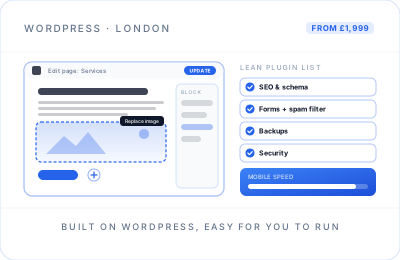
My WordPress sites are built the other way round. The theme contains only what your pages use, editing happens in the standard block editor within guard rails I set up, and every plugin has to earn its place. The result is a site that loads quickly, is simpler to keep secure, and that your team can update with confidence.
Lean underneath, simple to edit on top.
Lean Custom Theme
Designed for your business and coded without the bloat of a multipurpose theme, so each page loads only the styles and scripts it needs.
Editing You Can Trust
Reusable blocks and patterns for your common layouts, so you can add a service page or a blog post that matches the design every time.
A Short Plugin List
Only well-maintained plugins with a clear job: SEO, forms, backups, security and caching. Each one is documented at handover.
Security Hardening
SSL, two-factor login for admins, limited login attempts, sensible user roles and spam filtering on every form from day one.
Speed Built In
Compressed, correctly sized images, page caching and minimal third-party scripts, checked against Core Web Vitals before launch.
SEO & Schema Setup
Yoast SEO or Rank Math configured properly, clean permalinks, an XML sitemap and schema for your business, services and articles.
Handover Your Team Will Actually Use
A recorded walkthrough of your own site: editing pages, adding posts, swapping images and updating opening hours. Separate logins for each person, with editor access for day-to-day work and admin access kept to a minimum.
Custom theme or page builder? An honest comparison.
Page builders such as Elementor or Divi are popular for good reasons. They also come with costs that only show up later. Here is how the two approaches usually compare for a small business site.
| What matters | Lean custom theme | Page builder theme |
|---|---|---|
| Mobile page speed | Light code; each page loads only what it uses | Often loads extra scripts and styles on every page |
| Day-to-day editing | Edit text, images and pages in the block editor, within the design | Drag-and-drop freedom, which also makes the layout easier to break |
| Plugins to maintain | A short list with a clear job each | The builder, its add-ons and their updates |
| Switching later | Standard WordPress content that moves cleanly | Content can stay tied to the builder's own format |
| Upfront effort | More design and build time at the start | Faster to assemble from ready-made sections |
| Best suited to | Businesses that want speed and a site that stays tidy for years | Teams that redesign their own layouts often |
My default is the custom theme. If your team genuinely needs a page builder, I will say so and build it carefully instead.
When WordPress is not the right choice
WordPress is my usual choice for service businesses, but I do not recommend it for everyone. If one of these describes you, I will suggest something else on the discovery call.
- You mainly sell products. A hosted platform like Shopify handles checkout, payments and hosting for you. See ecommerce website design.
- Nobody will ever edit the site. A lightweight static site has no admin area to update or secure, and is very fast.
- You need an application, not a website. Complex portals, quoting tools or dashboards call for custom development.
- Nobody will keep it updated. WordPress needs regular core, theme and plugin updates. If that will not happen in-house, budget for a maintenance plan or choose a platform that updates itself.
A website that became a lead source.
London FS, a London mortgage broker, started with a limited digital presence and no systematic way to follow up an enquiry. Its website was fully redesigned and launched with GA4 from day one, alongside SEO, email marketing and CRM management, and it now runs as one connected system, reviewed every month.
Read the London FS case studyWordPress website design in London, from someone who measures results.
WordPress remains the most practical choice for many London service businesses: accountants, clinics, consultancies, trades and agencies that publish content and want to change their own pages. It runs on almost any hosting, it is not tied to one company, and if you ever move on from me, any competent WordPress developer can pick it up. Those are real advantages over closed website builders.
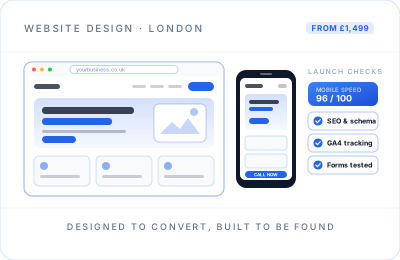
What separates a good WordPress build from a frustrating one is restraint. I plan the page structure and search terms before designing anything, build a theme around that plan, and set up the SEO plugin, schema and sitemap so Google reads the site the way it was intended. If ranking is a priority, WordPress SEO and technical SEO build on that foundation. Every form, call button and booking link is tracked in GA4, so you can see which pages actually bring in enquiries.
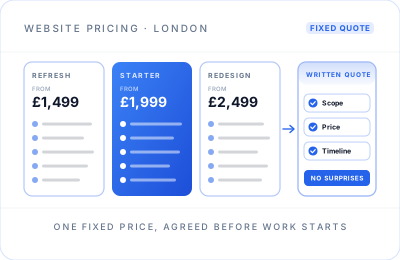
Already on WordPress but unhappy with it? A rebuild does not have to mean throwing everything away. If the site is structurally sound and only needs a visual and content update, a Website Refresh starts from £1,499. If it needs replacing, a website redesign from £2,499 moves your existing posts, pages and media into a new, lighter theme, with redirects in place for any URLs that change, so the content you have already published keeps working for you.
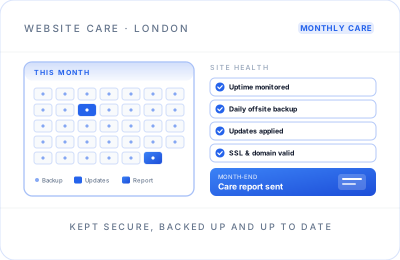
A WordPress site is not finished at launch. Core, theme and plugin updates arrive every month, and out-of-date plugins are a common way for small business sites to get compromised. You can run updates yourself after the handover, or hand them to me through a website maintenance plan.
New WordPress builds start from £1,999 and follow the same fixed-price process as every other site build; the pricing page compares the packages side by side. I work remotely with businesses across London and the UK.
WordPress questions.
Cost, page builders, plugins, security and SEO.
A custom WordPress website starts from £1,999 as a one-off fee, including a lean custom theme, on-page SEO, GA4 tracking and 30 days of support. The final figure depends on the content, features and integrations you need, and it is fixed in a written scope after a free discovery call.
Usually not. The site is built on a lean custom theme that works with the WordPress block editor, which keeps pages lighter and leaves less to update. If your team genuinely needs to redesign layouts often, a page builder can be the right call, and I will explain the trade-off before recommending one.
As few as the site genuinely needs. A typical build uses a handful: SEO, forms with spam protection, backups, security and caching, plus anything your business specifically requires. Every plugin is chosen because it is well maintained, and each one is listed at handover, because every extra plugin is more code to update and secure.
By keeping plugins few and reputable, using strong admin passwords with two-factor login, limiting login attempts, running SSL and keeping core, theme and plugins updated. Security depends on those updates continuing after launch, so I offer an optional monthly maintenance plan that covers updates, backups and monitoring.
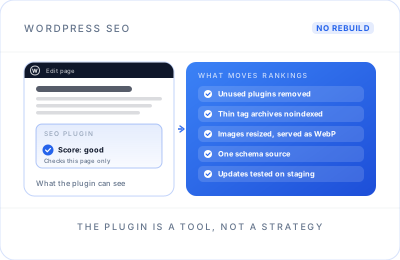
Usually Yoast SEO or Rank Math, configured properly rather than left on defaults. I set page titles and descriptions, the XML sitemap, sensible indexing rules and schema for your business and services, then verify the site in Google Search Console. The plugin is a tool; the page structure and content do the real work.
When you mainly sell products and want inventory, checkout and payments managed for you, Shopify is often simpler. When nobody will ever edit the site, a lightweight static site needs less upkeep. Complex web applications need custom development. I will tell you on the discovery call if WordPress is not the right fit.