I get asked this constantly, and the confusion is understandable. Google Tag Manager and GA4 are often mentioned in the same breath, and plenty of businesses have one but not the other. Or both, but set up incorrectly.
They are connected, but they are not the same tool. Understanding the difference is one of the simplest ways to understand why your tracking may be limited, unreliable or difficult to change.
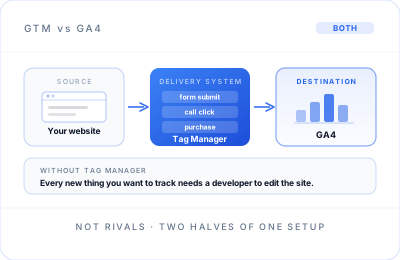
Think of it like a delivery system and a destination
GA4 is where your data lives: the reports, dashboards and analytics that help you understand what visitors do on your website. Google Tag Manager is the delivery mechanism: it manages the tracking tags that decide what data is collected, when it is collected and where it is sent.
What GA4 does
Google Analytics 4 is your analytics platform. It receives data from your website and turns it into reports: where visitors came from, which pages they viewed, what actions they took and whether they completed the conversions you care about.
In simple terms, GA4 is where you go to answer questions such as: Which channel generated the most qualified leads? Which landing page is losing visitors? How many people booked a call or made a purchase? It is the destination for the data, and the place you use to make decisions from it.
What Google Tag Manager does
Google Tag Manager is a tag-management system. It gives you one controlled place to manage tools such as the Google tag, GA4 events, Google Ads conversion tracking, consent settings and other measurement tags.
You can install GA4 directly on a website without Tag Manager, and many small business sites do exactly that. The limitation is flexibility. Every time you need to track a new button click, a form submission or a phone-number tap, someone may need to edit the website code directly.
Tag Manager removes much of that bottleneck. Once it is properly set up, many tracking changes can be added or adjusted through the container rather than through a code release. More complex tracking can still need developer support, particularly where the site needs to expose extra information through its data layer, but the day-to-day system becomes far easier to manage.
Why this matters more than it sounds
Businesses that skip Tag Manager often end up with GA4 configured once at launch and never properly expanded. They can see pageviews and basic traffic, but little about what actually matters commercially: whether someone clicked “call now”, submitted a contact form, booked a consultation or completed a purchase.
Businesses that have Tag Manager but have never audited it can face the opposite problem. Tags may fire incorrectly or more than once. Old tracking may still be running. Events may be collecting data that nobody has looked at in over a year. Containers quietly accumulate redundant or broken tags when nobody goes back to check.
Both situations produce a dashboard that appears to work. That is why they are easy to miss. But if the data is incomplete or inflated, the decisions based on it will be unreliable too.
What good looks like
A properly configured setup has Google Tag Manager sending clean, accurate data into GA4. GA4 is then configured with conversions that reflect what matters to your business: qualified leads, calls, bookings, purchases or another meaningful outcome.
It also has clear ownership. Someone knows which tags are live, why they are there, what each conversion means and how consent affects measurement. The setup is documented, not treated as a mysterious piece of code no one wants to touch.
Finally, it is checked periodically. Tracking can quietly break over time: websites change, plugins update, forms are replaced and tags stop firing without an obvious warning. A regular review prevents a small issue becoming six months of unreliable reporting.
If you are not confident your own setup does this, it is worth having someone check. Not because the fix is usually complicated, but because most businesses do not know what to look for until something has already gone wrong.
Need a reliable GTM and GA4 setup?
Explore the Analytics & GA4 service to see how clean tracking can give you data you can trust and decisions you can act on.
Explore Analytics & GA4