Most business owners never question their GA4 numbers. They trust the dashboard, make decisions from it, and assume that because the figures look plausible, they must be right.
The uncomfortable truth is that many GA4 setups are quietly wrong. Events can fire twice, important conversions can go unrecorded, and consent settings can block data without anyone noticing. The dashboard still loads. The charts still move. But the picture you are making decisions from may not reflect what is actually happening in the business.
Here are five signs worth checking before you put too much faith in the numbers.
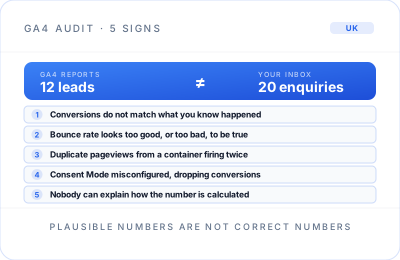
1. Your conversion numbers do not match what you actually know happened
If GA4 says you had 12 leads last month, but you know for a fact that 20 enquiries landed in your inbox, something is broken in the tracking, not in your business.
This is one of the most common issues in a GA4 audit. It is usually caused by a tagging or trigger configuration problem: a form submission event is attached to the wrong action, a thank-you page is not loading consistently, or a conversion has never been marked as a key event in the first place.
Start with a simple reconciliation. Compare tracked leads against form submissions, booked calls, phone logs and CRM records for the same period. They may not match perfectly, but a persistent gap is a reason to investigate.
2. Your bounce rate looks suspiciously good or suspiciously bad
GA4 measures engagement differently from old Universal Analytics. That change has caught out plenty of otherwise sensible setups. A badly configured engaged-session definition, or events that fire too easily, can make your bounce rate look far better or far worse than reality.
A very low bounce rate is not automatically a win. If a scroll event or timer is firing on every page, GA4 may record sessions as engaged even when visitors do little of value. Equally, a very high bounce rate can be misleading if important interactions are not tracked.
If the number does not match your sense of how people behave on the site, or it looks dramatically different from similar pages and channels, it is worth checking the events and engagement settings behind it.
3. You have duplicate or inflated pageviews
Duplicate pageviews usually point to a Google Tag Manager container firing more than once per page load. A common cause is an old analytics snippet that was never removed when GA4 replaced Universal Analytics, alongside a newer GTM implementation.
It quietly doubles traffic numbers, and nobody questions it because more traffic does not feel like a problem. But inflated sessions make every other metric less trustworthy: conversion rates appear lower, channel performance becomes distorted, and reporting drifts away from reality.
A quick check in Tag Assistant or GTM Preview mode can reveal whether your Google tag is firing more than once. It is a small technical check with a large impact on the quality of your reporting.
4. Consent Mode is misconfigured
Consent Mode is now an essential part of a reliable analytics setup. A genuinely common issue is tags firing before a visitor has consented, or conversion data being silently dropped because consent signals are not wired up correctly.
This can affect both compliance and measurement. In some cases, Google Ads stops importing conversions correctly, yet no clear error message appears to explain why. The campaign continues to spend, but the optimisation data it needs is incomplete or missing.
Test your consent banner, your default consent state and the way consent updates are passed into Google Tag Manager. The goal is not simply to have a banner on the site; it is to make sure that the analytics and advertising tools behave correctly once a visitor makes their choice.
5. Nobody can explain how a number is calculated
If you ask, “How is this metric actually defined?” and nobody in the business can answer confidently, that is a warning sign. It often means the setup was configured once and never properly documented or understood afterwards.
This matters most for the numbers that shape decisions: leads, qualified enquiries, purchases, booked calls and campaign conversions. You should know what triggers each one, whether it can fire more than once, and where it is used in reporting or advertising platforms.
Numbers you cannot explain are numbers you should not be using to justify budget, judge a channel or set targets. At best, they are a rough indication. At worst, they are leading you in the wrong direction.
What to do about it
None of these problems are especially difficult to fix once you know they are there. The hard part is spotting them before months of decisions are made on data that cannot be trusted.
A proper GA4 audit checks tagging accuracy, conversion definitions, duplicate tracking, consent configuration and whether the reported numbers reflect reality, not simply whether the dashboard loads. It should leave you with a clear record of what is working, what is not, and what needs to change.
If any of the signs above sound familiar, it is worth having someone check rather than continuing to make decisions on numbers you cannot fully trust.
Need to know whether your GA4 data is reliable?
Explore the Analytics & GA4 service to see how a practical audit can identify broken tracking, fix measurement gaps and give you numbers you can act on.
Explore Analytics & GA4