Website speed sounds like a technical detail until you see the effect it has on the customer journey. Slow mobile load times do not just annoy visitors. They can cause people to leave before they have seen the offer, read the proof or had a chance to take the next step.
That makes performance part of conversion rate optimisation. A website cannot convert a visitor who never reaches the meaningful content of the page.
What Core Web Vitals actually measure
Google’s Core Web Vitals answer three concrete questions about a visitor’s experience: how quickly the main content appears, how responsive the page is when someone tries to interact with it, and how stable the layout remains while the page loads.
- LCP (Largest Contentful Paint): how long it takes for the main visible content to load.
- INP (Interaction to Next Paint): how quickly the page responds to a user interaction.
- CLS (Cumulative Layout Shift): how much the layout unexpectedly moves around as it loads.
The headline metric most businesses should care about is LCP: how long until the main thing on the page is visible. Google’s threshold for a good LCP is 2.5 seconds or less for most users. If your key page is taking much longer than that on mobile, it is worth investigating properly.
These metrics are not just lab-test scores. Where enough real-user data exists, Google evaluates the 75th percentile of user experiences over time. That is why checking mobile and desktop separately matters: the experience on a developer’s laptop can look very different from the experience of an actual customer on a phone.
A real example worth understanding
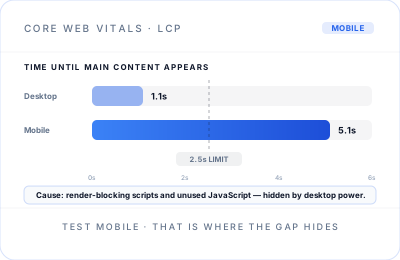
I recently diagnosed a site where desktop load times looked perfectly healthy: around 1.1 seconds, genuinely fast. Mobile told a completely different story. It took around 5.1 seconds before the main content appeared.
That gap matters because mobile visitors can be using slower networks and less powerful devices. A desktop test can mask processing problems that become highly visible on a phone.
The cause traced back to render-blocking scripts and unused JavaScript: code being loaded and processed before the page could display its important content, including code that was not doing anything useful for that particular page. The desktop experience hid the issue because desktop devices could push through that work much faster.
The client remains anonymous, but the pattern is common. A site can look fine in the environment used to build or manage it while real mobile visitors get a noticeably worse experience.
Why this is a business problem, not just a technical one
Every extra second before your main content appears is another opportunity for a visitor to lose patience, get distracted or return to the search results. That is not a technical inconvenience. It is a lost opportunity to explain your offer and earn the enquiry or sale.
A slow mobile site is not only losing people who saw the offer and said no. It can lose people before they see the offer at all. That is why a CRO consultant in the UK should care about page speed alongside headlines, calls to action and conversion forms: performance affects whether visitors ever reach those things.
The practical question is simple. Is your website making it easy for a visitor to reach the moment where they can decide? If the answer is no, a technically small fix can have a commercially meaningful effect.
How to check your own site
Google’s PageSpeed Insights is free and will show you Core Web Vitals and performance diagnostics for a page. Check your important customer-facing pages, not just the homepage, and check mobile as well as desktop.
Look first for real-user field data when it is available, then use the lab-data diagnostics to understand likely causes. A low-traffic or newly published page may not have enough real-user data yet, which does not mean it is fast; it simply means you should treat the Lighthouse result as a useful diagnostic rather than a complete verdict.
If your mobile LCP is above 2.5 seconds, or you see a large desktop-versus-mobile gap, investigate it properly rather than simply noting the score and moving on.
The fix is not always what you would expect
Slow sites are not always slow because of one big, obvious problem such as a huge image. Often it is an accumulation of smaller inefficiencies: scripts loaded where they are not needed, plugins doing more work than necessary, render-blocking resources and legacy code stacking up as a site evolves.
The right fix starts with finding the actual bottleneck rather than applying generic speed tweaks. That might mean deferring non-critical JavaScript, removing unused code, changing how a feature loads, optimising the LCP element or addressing a server-side delay. The answer depends on the page and its technology.
If you have never checked your mobile load times specifically, it is worth five minutes to find out where you stand. It may reveal a performance problem that is quietly costing you customers before they ever get a chance to consider your business.
Need a website that is fast, clear and built to convert?
Explore Website Delivery to see how performance, customer journeys and conversion-focused design can work together.
Explore Website Delivery